

First Impressions of WebpCloud's In-Browser Image Stitcher
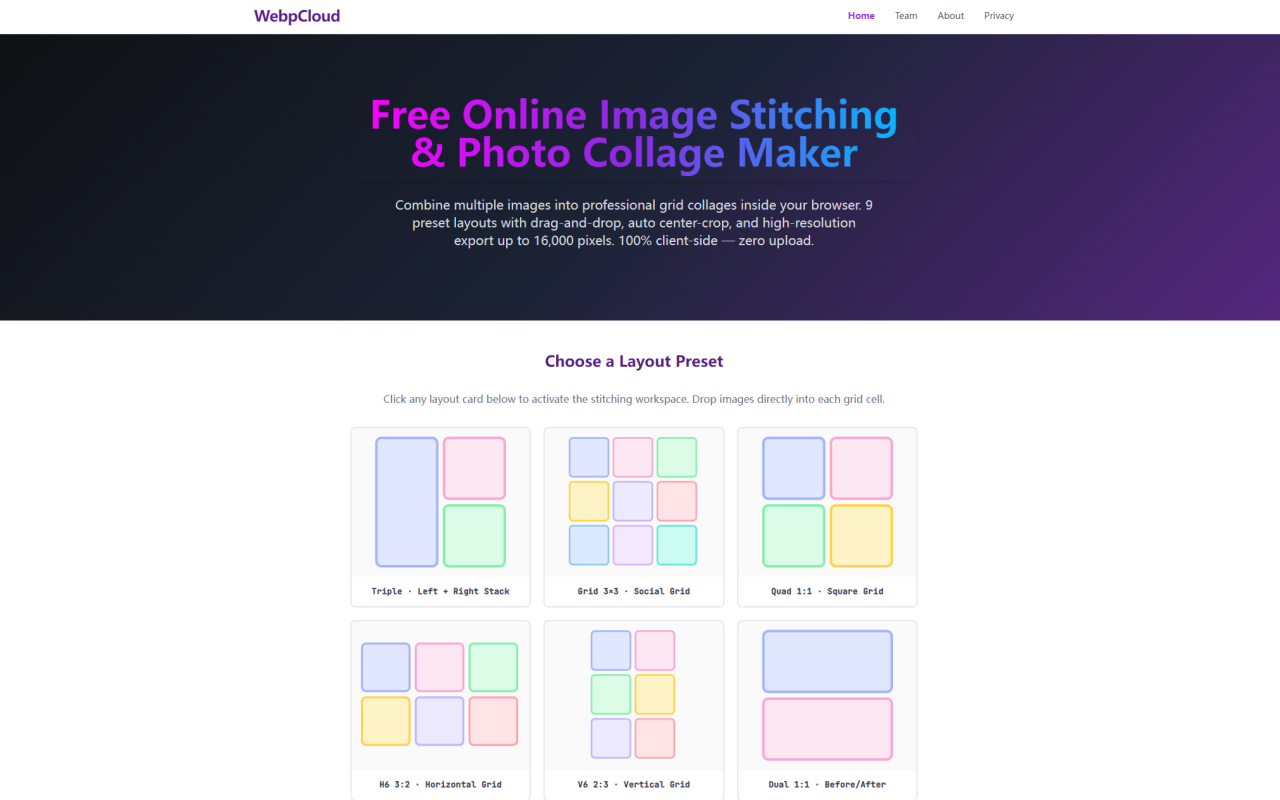
Upon visiting WebpCloud at webpcloud.com, I was immediately struck by the tool's no-nonsense interface. The homepage presents a stark, clean workspace with nine layout preset cards arranged in a grid. There are no sign-up pop-ups, no tutorials—just a blank canvas and a simple prompt to drop images. As a senior tech journalist who has tested dozens of image editing tools, I appreciate this frictionless onboarding. The dashboard clearly labels each preset: Triple, Grid 3×3, Quad 1:1, H6 3:2, V6 2:3, Dual 1:1, Dual 2:3, Horizontal Strip, and Vertical Strip. Clicking any card instantly expands the workspace, and I could drop up to 10 images directly into the grid cells. The tool runs entirely in the browser—no uploads to a server, no queue latency. Within seconds, I had a 3×3 social grid assembled using test photos. The process felt snappy and private, exactly as promised.
How WebpCloud Works: Layout Presets and Client-Side Processing
WebpCloud is a serverless, framework-free image stitcher that processes all operations locally inside your browser. The core workflow is simple: choose a layout preset from the 9 options, then drag and drop images into the cells. Each preset is tailored for specific use cases—the Dual 1:1 preset works perfectly for before-and-after comparisons, while the H6 3:2 preset suits panoramic social media banners. The Horizontal Strip and Vertical Strip presets enable infinite linear stitching, ideal for long webpage screenshots or comic strips. I tested the Triple layout (Left + Right Stack) by dropping three images of different aspect ratios. The auto center-crop engine kicked in, proportionally downscaling and centering each image to fill its slot without stretching. I could also drag and swap images between cells—no need to clear and re-upload. The tool provides slider controls for gap (0 to 30 pixels) and border (0 to 10 pixels), giving fine control over spacing. Once satisfied, clicking "Stitch & Download" triggers individual file downloads in PNG or WebP format, skipping ZIP archives entirely. This sequential download loop is a thoughtful touch for mobile users or anyone without decompression tools.
Performance and Technical Guardrails
WebpCloud enforces hard technical boundaries to prevent browser crashes. The maximum output resolution is capped at 16,000 pixels on the longest edge. When I attempted to stitch ten 5MB images into a horizontal strip, the tool automatically downscaled the composite to stay under that limit, keeping memory usage below 125MB. This is a smart safeguard against Out-of-Memory (OOM) failures, a common issue with other browser-based stitchers. The engine normalizes a base margin of 2,048 pixels in memory, ensuring smooth linear compilation. During my tests, even with six high-resolution photos in the 6-grid vertical preset, the interface remained responsive with no lag. The drag-and-swap mechanics are implemented via pointer events, and the auto center-crop algorithm calculates bounding box coordinates on the fly—no raw pixel distortion. I appreciate the engineering transparency: the FAQ explains the 16,000-pixel ceiling explicitly, and the team states that all operations are air-gapped within the browser sandbox. This level of detail builds trust.
Pricing and Privacy: What You Need to Know
Pricing is not publicly listed on the website because WebpCloud is completely free to use. There are no premium tiers, no subscription plans, and no credit card requirements. Monetization relies on non-disruptive banner ads displayed above the title, along with future contextual B2B link integrations. The tool is maintained by 345tool, an independent open-source collective. Privacy is a standout feature: every image operation happens 100% client-side. No files are ever transmitted over the network, and the tool remains fully operational even offline (after the initial page load). This serverless architecture eliminates data security friction. There are no tracking cookies or intrusive analytics. For professionals handling sensitive photography, this air-gapped approach is a major advantage. The only limitation on use is the 5MB per file cap and a 10-file batch limit—both clearly stated on the interface. The 16,000-pixel ceiling ensures stability, but power users working with ultra-high-resolution images may find the ceiling restrictive.
Strengths and Limitations of WebpCloud
Strengths: The tool is exceptionally fast and private. Its serverless design means zero latency and no upload bottlenecks. The nine layout presets cover a wide range of common use cases, from social media grids to panoramic strips. Drag-and-swap functionality and auto center-crop eliminate the pain of re-uploading mismatched images. The lack of ZIP archives streamlines the download workflow. The 16,000-pixel cap, while a limitation, prevents browser crashes and keeps performance smooth. The tool's minimalist aesthetic aligns with 345tool's stated philosophy of replacing bloated web utilities.Limitations: The 5MB per-file and 10-file batch limits can be restrictive for professional workflows involving raw photos or large batches. There is no support for advanced editing features like filters, text overlay, or layer adjustments—this is purely a stitcher. The presets, while useful, are fixed; users cannot create custom grid dimensions (e.g., non-standard aspect ratios or irregular cell shapes). The tool also lacks a preview of the final composite before download; you must trust the auto-crop. Additionally, there is no undo history or ability to rearrange images after swapping beyond the drag-and-drop. For users who need more control, alternatives like Canva or Adobe Express offer far more flexibility, but at the cost of requiring sign-ups and cloud processing.
Who Should Use WebpCloud and Alternatives
WebpCloud is best suited for social media managers, content creators, and small business owners who need to quickly assemble photo grids for Instagram, Facebook, or before/after comparisons. Its privacy-first approach makes it ideal for photographers handling sensitive client images. The tool is also excellent for developers or designers who want a lightweight, open-source-like utility without ads or logins. However, power users who need to stitch more than 10 images, work with files larger than 5MB, or require custom layouts should look elsewhere. Competitors like Canva offer a free grid tool with more presets and editing features, but they upload images to cloud servers. Another alternative, Adobe Express, provides batch photo stitching with resizing options but requires an Adobe account. For a truly zero-friction, offline-capable image stitcher, WebpCloud stands alone. If your needs match its guardrails, this tool is a gem. Visit WebpCloud at https://webpcloud.com to explore it yourself.








Commentaires